Posted on December 14th, 2010 by Kim
Photoshop Formula using Totally Rad Actions for bringing life to hair. I was working on some photos I did for a shelter fund raiser and I stumbled upon this fun formula that I wanted to share with you. For this formula you need the following ingredients: Totally Rad Actions 2 – The Revenge. Open the [...]
Filed under: Christmas, News, Photoshop Formulas, Totally Rad Actions | Comments Off
Posted on June 1st, 2010 by Kim
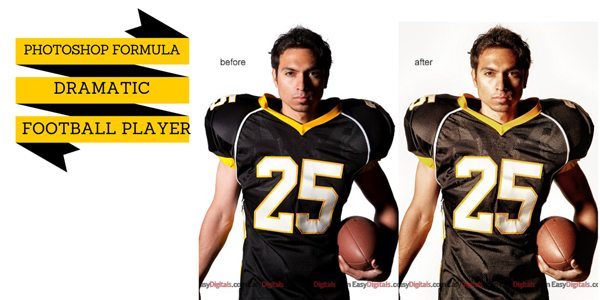
As promised, today I’m going to show you how I got the look for the football player on the free May Magazine cover template. For this formula you need the following ingredients: Topaz Adjust, TRA 1 Actions, TRA 2 Actions. Photoshop Formula: Open the photo you want to work on in Photoshop Run the Topaz [...]
Filed under: News, Photoshop Formulas, Topaz Labs, Totally Rad Actions | Comments Off
Posted on March 15th, 2010 by Kim
Today is the last day for the Topaz Labs Sale using the code NEWADJUST. So don’t forget to get it today if you want it. The new release of Topaz 4 is a free upgrade so if you already have Topaz Adjust be sure to download it and start using it. If you don’t have [...]
Filed under: News, Photoshop Formulas, Topaz Labs | 10 Comments »
Posted on March 10th, 2010 by Kim
This time I played with Topaz Adjust 4′s new “Sketch – Pencil” filter and see if I could add a little pizazz to the basic sketch. Here is what I came up with. Photoshop Formula: Touch up your photo as usual in color so that it looks good. Open your image in Photoshop and run [...]
Filed under: News, Photoshop Formulas, Topaz Labs | Comments Off
Posted on March 8th, 2010 by Kim
For this poster I used an extracted photo and I wanted to put a black & white photo as the background. When I did a normal conversion I felt that the background was too busy. My solution was an action from Totally Rad Actions to give the black and white photo a more muted look. [...]
Filed under: News, Photoshop Formulas, Totally Rad Actions | Comments Off
Posted on March 2nd, 2010 by Kim
I took a little time to play with the new upgrade to Topaz Adjust 4 from my buddies over at Topaz Labs. I have to say that I was not disappointed. I got a little carried away with the new preset’s layout and more specifically the HDR – Sketch preset. I also love the ability [...]
Filed under: News, Photoshop Formulas, Topaz Labs | 7 Comments »
Posted on February 13th, 2010 by Kim
For today’s Photoshop Formula I used the following: Magazine Covers Vol 4 Totally Rad Actions 2 The Revenge Imagenomic’s Portraiture Formula: Totally Rad – Pool Party change opacity to 20% Totally Rad – Grandma’s Tap Shoes change opacity to 20% Select-O-Sharp on hair, eyes, lips and tattoo On the main baby layer run Portraiture Normal [...]
Filed under: Imagenomic, News, Photoshop Formulas, Totally Rad Actions | Comments Off
Posted on February 2nd, 2010 by Kim
Today’s Photoshop formula includes 2 new partner products and a discount code for EasyDigitals.com customers (see below). Photoshop Island’s new fantastic products are Iron Grunge Font Family & Brushes . Also, look for tutorials from Photoshop Island for each product in the above links. These products are very high quality and skillfully and thoughtfully created. [...]
Filed under: News, Photoshop Formulas, Photoshop Island, Topaz Labs | Comments Off
Posted on January 27th, 2010 by Kim
Topaz Adjust is an incredible Photoshop plug-in and a must-have for sports photographers. Want some drama for your photos? Sometimes when I run the Dramatic filter it shows too much detail and noise. Especially in women it can be unflattering because it shows imperfections in the face. To counter that I like to run a [...]
Filed under: News, Photoshop Formulas, Topaz Labs | 2 Comments »
Posted on January 22nd, 2010 by Kim
Today I have 2 Photoshop Action formulas to share. These are the photos I featured in yesterday’s blog post showing how the Classic Charm can be used for feminine or masculine cards. Formula: Totally Rad Actions Bitchin B&W 100% {from TRA1 – Color Blind v1.2a} Rusty Cage 100% {from TRA1 – Caffeine Jolt V1.2} Move [...]
Filed under: News, Photoshop Formulas, Totally Rad Actions | Comments Off