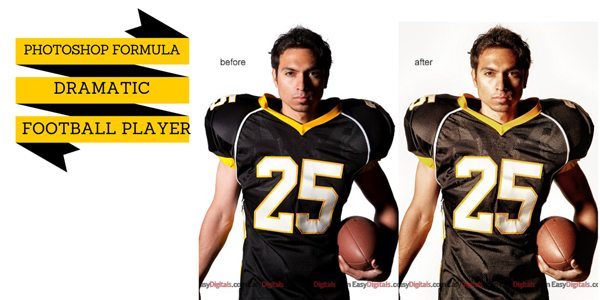
Photoshop Formula: Dramatic Football Player

As promised, today I’m going to show you how I got the look for the football player on the free May Magazine cover template.
For this formula you need the following ingredients: Topaz Adjust, TRA 1 Actions, TRA 2 Actions.
Photoshop Formula:

Open the photo you want to work on in Photoshop
Run the Topaz Adjust filter – Dramatic
Run [...]

Photoshop Formula {Muted Black & White}

For this poster I used an extracted photo and I wanted to put a black & white photo as the background. When I did a normal conversion I felt that the background was too busy. My solution was an action from Totally Rad Actions to give the black and white photo a more muted look. [...]

Photoshop Formula {Valentine Pin-Up}

For today’s Photoshop Formula I used the following:
Magazine Covers Vol 4
Totally Rad Actions 2 The Revenge
Imagenomic’s Portraiture
Formula:

Totally Rad – Pool Party change opacity to 20%
Totally Rad – Grandma’s Tap Shoes change opacity to 20%
Select-O-Sharp on hair, eyes, lips and tattoo
On the main baby layer run Portraiture Normal Mask and change opacity to 50%
Flatten layers
Add image [...]

Photoshop Formula {Totally Rad Actions}

Today I have 2 Photoshop Action formulas to share. These are the photos I featured in yesterday’s blog post showing how the Classic Charm can be used for feminine or masculine cards.
Formula: Totally Rad Actions

Bitchin B&W 100% {from TRA1 – Color Blind v1.2a}
Rusty Cage 100% {from TRA1 – Caffeine Jolt V1.2}
Move Rusty Cage Layer above [...]

Photoshop Formula: Totally Rad Actions SX-70

I love Photoshop actions. I also love  playing with photos and experimenting to elicit the feeling of the moment that I want to convey. To do that I start playing with my library of actions.
The following effect is what I like to call the “dreamy” look. Perfect for sun flare and romantic photos.
So here is [...]