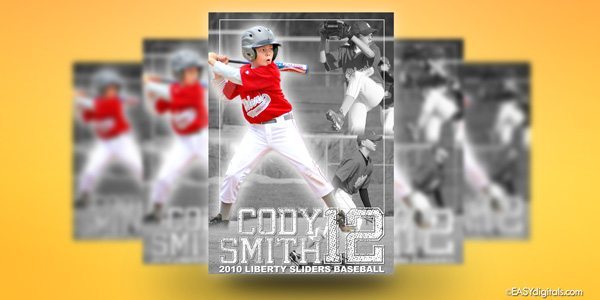
This time I played with Topaz Adjust 4’s new “Sketch – Pencil” filter and see if I could add a little pizazz to the basic sketch. Here is what I came up with.
Photoshop Formula:
Touch up your photo as usual in color so that it looks good.
Open your image in Photoshop and run Topaz Adust 4’s “Sketch – Pencil” filter.
Drag a texture or 2 into your photo. I used 2 textures, one was rough and one was more smooth. (You can get free textures all over the internet by doing a Google search)
Change your texture’s blending mode to overlay, see layer screen shot below. (or choose another blending mode that you like)
That’s it!
This new release is a free upgrade so if you already have Topaz Adjust be sure to download it and start using it.
If you don’t have Topaz Adjust, the coupon code NEWADJUST will not only save $10 off a new purchase of Topaz Adjust, but will also save 20% off of any bundle purchase or Adjust->Bundle upgrade.
Inspiration comes from everywhere, TV, web sites, magazines, bill boards and even product boxes.
Here are a few web sites I love. I hope they boost your sports photography excitement and inspiration.
Angelika Rinnhofer – Angelika was recently featured in the January 2010 Issue of Professional Photographer Magazine. She came to their attention for her moody portraits of young female athletes stylized in Rembrandt poses and lighting, yet they are dressed to reflect who they are. (the link is a scroll horizontal so it’s a little confusing but scroll right for more images)
Dave Hill – I’ve been a long time fan of Dave Hill’s creative works of art. Dave’s site is a great source for inspiration. I’m not really sure how he creates his masterpieces and I’ve heard his secrets are heavily guarded. My best try with the techniques is Topaz Adjust’s HDR – Sketch.
ProPoint Media - A very talented photographer who offers fantastic composite posters to his customers.
Baseline Sports Media – These guys design sports posters and memorabilia for the pros. Great ideas and inspiration.
ESPN – I do get great inspiration for browsing around at the photos of the professionals. I like to see the graphics on their TV program. I also watch Sports Center for great video graphics and even their stage sets are cool and inspiring.
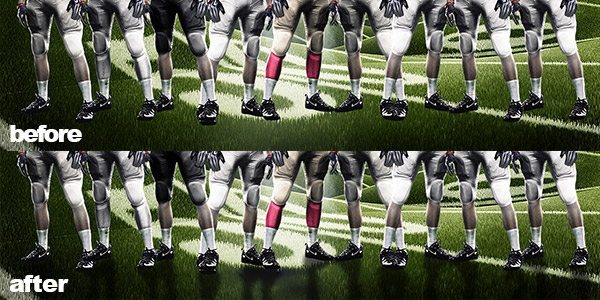
For this poster I used an extracted photo and I wanted to put a black & white photo as the background. When I did a normal conversion I felt that the background was too busy. My solution was an action from Totally Rad Actions to give the black and white photo a more muted look. Check it out:
This time I wanted to try making an opening slide for this series of photos of cute little Kenzie (and her friend Brody, who happens to be my busy little nephew). So I used some layers from Simple Elegance Vol 6 with her name on it. I thought it complimented the session nicely. I hit the “remix” button on Amimoto a few times until I found one that I really loved.
I took a little time to play with the new upgrade to Topaz Adjust 4 from my buddies over at Topaz Labs. I have to say that I was not disappointed. I got a little carried away with the new preset’s layout and more specifically the HDR – Sketch preset. I also love the ability to suppress the noise with the sliders provided. I hope I have time to show you some more samples later this week with some other presets.
This new release is a free upgrade so if you already have Topaz Adjust be sure to download it and start using it.
If you don’t have Topaz Adjust, the coupon code NEWADJUST will not only save $10 off a new purchase of Topaz Adjust, but will also save 20% off of any bundle purchase or Adjust->Bundle upgrade.
This coupon code will expire on March 15, 2010.
I hope you enjoy this upgrade as much as I have!
Photoshop Formula 1:
Run Noiseware (This step will depend on how much noise your original photo has}
For up to 6 entries do any of the following (you have to leave comments here to be entered):
Join the EasyDigitals.com Flickr.com group. (Then leave a comment below saying you did it)
Add an image of something you created with an EasyDigitals.com template to the Flickr.com group (Then leave another comment below saying you did it)
Vote or add an idea to the EasyDigitals.com Feedback Forum.
Join the EasyDigitals.com facebook group and share this post with your friends there. (Then leave another comment below saying you did it)
Post one of your images combined with any EasyDigitals.com template design on the EasyDigitals.com facebook group. (Then leave another comment below saying that you did it)
Sign up for the Easydigitals.com RSS feed. (then leave another comment below saying that you did it)
The winner will be picked by random.org on March 15th, 2010.
Please leave a comment here for each option that you do letting me know you did it, up to 6 entries per person max (1 comment for each entry up to 6 comments). If you are already an RSS subscriber, facebook group member and/or Flickr.com member leave a comment stating that you are already a subscriber or member.
Now you can give and get inspiration from other EasyDigitals.com template users on Flickr.com. If you’re a Flickr.com user or if you’ve wanted to try it, this is your chance. This is a great best place to post your designs and show off what you can do using EasyDigitals.com templates.
Personally, I find the work in many Flickr groups to be another excellent source of inspiration. Aside from the billions of photos on Flickr, there are also some groups that have been established to showcase the work of designers.
Of course, if you are a Facebook.com regular, you can still find us on there too! So try one or both and have fun.
Try adding EasyDigitals.com titles to your Animoto Videos. Check out this sample I did with a recent photo session. I added the title from Quick Poster Vol 8 on the first photo.