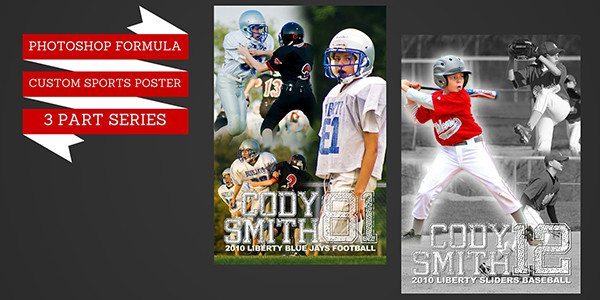
Creating a Custom Sports Poster in Photoshop {3 Part Series}

This series is based on many requests I receive for similar posters. Use your creativity to change it and make it your own design. Part 1: This tutorial covers creating the Poster size, adding 3 images and blending the edges. Part 2: This tutorial covers adding text, and sizing. Part3: This quick tutorial covers adding [...]

New Tutorials {Quick Poster Vol 8 – Photoshop & Elements}

Tutorials on Quick Poster Vol 8 Photoshop: Photoshop Part 1 Photoshop Part 2 Elements: Elements Part 1 Elements Part 2 Related Product: Quick Poster Vol 8

Video Tutorial {Elements Fixing Skin Blemishes & Resize}

This is part 3 of my 3 part tutorial set on enhancing your photos. In this tutorial I will show you how to quickly remove blemishes and crop to standard printing sizes. Let me know if you have any questions or comments in the area below.

Video Tutorial {FREE & Easy Noise Reduction With Imagenomic}

Today I’m launching the first in a series of Photoshop Elements tutorials for beginners. I hope you find them useful. My goal is always to help you make your photos look their best. I welcome feedback below. In this first video I am preparing the photo for enhancements in Elements by using a free program [...]

New Tutorials for Photoshop: Christmas Cards Vol 5 & Photo Cards Vol 3

Yippee! 3 new Photoshop tutorials! Part 1:  Learn about the basic layers and styles of the cards and how to change colors and text. Also, how to add a photo. Part 2: Learn how to add  4 photos to the template with the included shapes. Also learn how to resize all the photos and frame [...]

4 New FREE Video Tutorials on Photoshop Brushes

As promised, I have 4 new and exciting tutorials on the fantastic looks you can create with Brushes. This includes the instructions on how I created the look of the Splatter Paint cover for Industrial Grunge Vol 7. Also included is how to add sports silhouettes to your Photoshop templates. Part 1 – Loading Brushes [...]

How to Adjust Sports Photos Like a Pro: Part 3 Topaz adjust

In part 3 of my post processing tips, I go over one of my favorite plug ins for sports photos, Topaz Adjust. Topaz adjust is a very cool program and it’s also pretty reasonably priced. Related Product page: Topaz Adjust Topaz Adjust Samples:

How to Adjust Sports Photos Like a Pro: Part 2 Curves

In Part 2 of my sports post processing tips. I touch on the basics of using curves to “turn up the lights” on your photo.

How to Adjust Sports Photos Like a Pro: Part 1

A few folks have asked me what my post processing steps are on my sports photos. In other words, how to make them bright, sharp and look color perfect. Thanks to some fellow photographers who have shared their secrets with me, I can now share some tips with you.

New Tutorial for Element users: Cutouts

We’ve had a few requests for a Elements tutorial for our popular Cutouts products. Thanks for all of you suggestions. I hope you enjoy this latest tutorial. New Elements Tutorial here. Related Products: Baseball CUTOUTS Football CUTOUTS